Yes, you can work remotely from a cruise ship. Connectivity has improved significantly across most major lines, and plenty of remote workers now book sailings that double as a change of scenery. The key is knowing what to plan for before you book. This guide covers cruise ship Wi-Fi, cabin setup, time zones, which lines work best for remote work, and how to find a sailing that fits your schedule. CruiseDirect can help you compare options and book the right ship for the way you work.
What's the Wi-Fi Actually Like on a Cruise Ship?
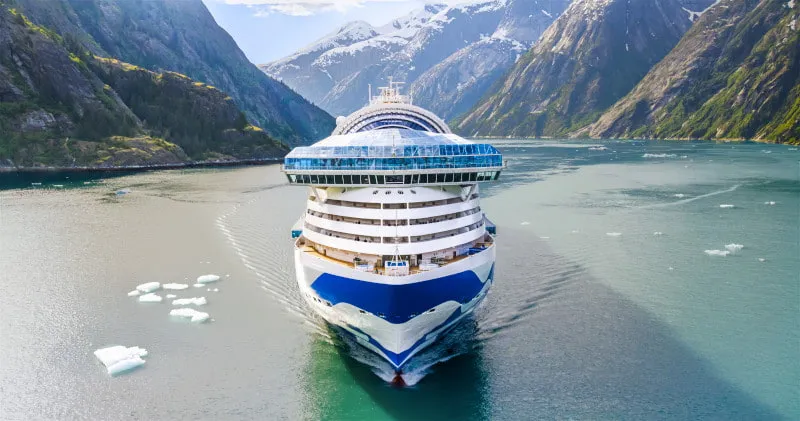
Cruise ship internet runs on satellite. That used to mean slow speeds, frequent drops, and video calls that cut out mid-sentence. That's changed on many ships, but not all, and the gap between a well-connected ship and an older one is wide enough to affect whether you can actually do your job at sea.
The biggest shift has been Starlink. SpaceX's low-earth-orbit satellite network delivers speeds comparable to a decent home connection on ships that have it. Norwegian Cruise Line has rolled Starlink out across its fleet. Royal Caribbean Cruises and Celebrity Cruises are mid-rollout. MSC Cruises is in earlier stages. Verifying which satellite system is on your specific ship before you book is worth the five minutes it takes.
On ships without Starlink, speeds vary. Sea days and peak hours are when you'll feel it most. Everyone trying to post the same sunset photo puts real strain on older satellite connections. File uploads slow down. Video calls drop. Email, messaging apps, and browser-based tools hold up better than anything requiring sustained bandwidth.
Most lines sell cruise ship internet in packages. Basic plans cover messaging and light browsing. Premium plans are faster and support video calls. On some ships, the premium plan is included in higher cabin categories or loyalty tiers. Check what's in your fare before adding a package at checkout.
What's realistic on a well-connected ship: email, Slack, video calls, browser-based work, and light file transfers. What's less reliable even on good connections: large file uploads, cloud backups running in the background, or multiple high-bandwidth apps running simultaneously.
For more on how technology is changing the experience at sea, see our piece on tech trends at sea and this deeper look at cruise ship innovations in onboard amenities and technology.
How to Set Up Your Cabin as a Remote Office
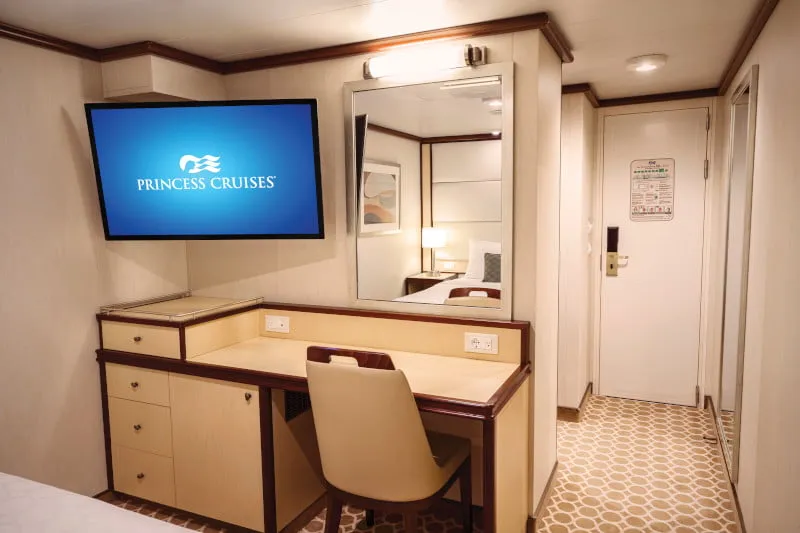
Your cabin setup matters more than most remote workers expect. Here's how to think about it before you book.
Must-haves:
- A desk with adequate lighting. Most cabins have a small desk or vanity area. Check cabin photos and reviews for your specific ship before booking. Some are too cramped for a full workday; others are genuinely functional. The desk size and chair quality vary more between ships than most people realize.
- Power outlets near the desk. US-flagged ships typically have US outlets. European and international lines may use EU sockets. Pack a compact universal adapter. Many newer ships also have USB ports built into the cabin, which helps with phone and tablet charging without taking up outlet space.
- A stable, adjustable chair. It sounds minor until hour three of a video call. Cabin desk chairs on older ships are often stiff or poorly shaped for long sessions. Reviews on sites like Cruise Critic often mention this. It's worth checking before you commit to a seven-night sailing where you plan to work daily.
Nice-to-haves:
- A balcony cabin. The natural light makes a real difference, and stepping outside between calls is better for focus than staying in the same four walls all day. It's not essential, but if you're working five or more hours a day, the upgrade is worth the cost difference.
- A cabin away from high-traffic areas. Rooms near elevators, nightclubs, or pool decks pick up noise at hours that matter for sleep and early morning calls. Ask about mid-ship, higher-deck positioning when booking.
- A portable laptop stand and external keyboard. Ships have limited desk space. A lightweight stand raises your screen to eye level, which reduces neck strain on longer days, and an external keyboard gives you more flexibility in how you position everything.
Before you pack, check our ultimate packing guide for your cruise for the full list of travel essentials.
Managing Time Zones and Your Schedule at Sea

Time zones are the part most remote workers underestimate. A Caribbean sailing from Miami stays close to Eastern time. A transatlantic route shifts your clock by five or six hours. A Mediterranean itinerary puts you seven hours ahead of the US East Coast, which changes when your workday lines up with your team's.
That gap matters for meetings. A 9am standup back home becomes 2pm for you in Europe. Workable. A 5pm sync becomes midnight. Less so. Map your regular call schedule against your destination's time offset before you book, not after.
Sea days are better for focused, deep work. Port days pull your attention, and if you're sailing for the destinations, you'll want to either front-load your hours before docking or push non-urgent work to the evening. Building your schedule around the itinerary rather than fighting it makes the whole trip function better.
For a comparison of two of the most popular destination regions for this kind of trip, see Mediterranean vs. Caribbean: Which Destination Should You Choose? and What Caribbean Cruise Should You Go On?
Which Cruise Lines Work Best for Remote Workers?

Not every line is equally set up for working remotely on a cruise ship. Here's where the main options stand:
Norwegian Cruise Line is one of the strongest choices for remote workers. Starlink is available fleet-wide, the freestyle dining model means no fixed meal times to work around, and the ships are large enough that you can find a quiet corner outside your cabin when you need a change of scenery. The layout of Norwegian ships also tends to have more lounge and library-style spaces that work well as informal offices.
Celebrity Cruises skews premium and quieter. The ships are well-maintained, connectivity packages are competitive, and the atmosphere on board is calm enough that working from a lounge or the library doesn't feel out of place. Strong choice if you want a more refined environment during downtime.
Royal Caribbean Cruises runs Voom, its own satellite internet service, which is faster than older satellite connections and now supplemented by Starlink on a growing number of ships. The fleet is large, which means more variety in spaces to work from. The energy on Royal Caribbean ships tends to be higher than Celebrity or Norwegian, which suits some remote workers and not others.
MSC Cruises offers competitive pricing and solid connectivity on newer vessels, though the rollout is less consistent than on Norwegian or Royal Caribbean. Good value option if you're flexible on exact ship.
One rule applies across all of them: read reviews on your specific ship. Connectivity, cabin layout, and noise levels vary within fleets. A ship from two years ago and one from 2012 sitting under the same brand name can offer very different remote work experiences.
How to Book a Cruise That Works Around Your Job
The best sailings for remote workers aren't always the shortest ones. Repositioning cruises and longer itineraries give you a more stable routine: fewer port stops, more sea days, and enough time to settle into a rhythm. If the idea of an extended sailing appeals to you, our guide to around the world cruises covers what longer itineraries actually look like in practice.
If you're traveling alone, the logistics simplify. One schedule, one set of decisions about when to work and when to explore. Solo cruising has its own dynamics worth reading up on before you book, including studio cabin options and single supplement policies that vary by line.
A few things to check before committing to a sailing:
- Choose a departure port you can reach without a cross-country flight the day before. Arriving tired and logistically stressed before you even board costs you a workday.
- Compare itineraries with a higher ratio of sea days to port days if you need consistent hours.
- Factor the internet package cost into your total budget before comparing fares across lines. A cheaper base fare with a $30/day Wi-Fi add-on can end up more expensive than a line that includes connectivity.
At CruiseDirect, you can filter sailings by destination, ship, and departure date across every major cruise line. Our team can match you to a ship based on your schedule, connectivity needs, and how you travel, not just the lowest price. The Best Price Guarantee means that if you find a lower advertised fare within 24 hours of booking, we'll match it. Browse our luxury cruises or compare the best cruise line for adults to see what fits, and reach out when you're ready to book a sailing that actually works remotely.


